Graycare (graycare.net) is a participant in the Amazon Services LLC Associates Program, an affiliate advertising program designed to provide a means for us to earn fees by linking to Amazon.com and affiliated sites. Learn More
"Aaargh! ExpressVPN doesn’t work after starting up my Mac computer!" — I shrieked.
"It works when I install the app again, but I have to install the app every time I restart my MacBook." — I grimaced.
That was the persistent problem I faced for months on end.
But it was my fault.
And here’s the five-step solution that worked for me:
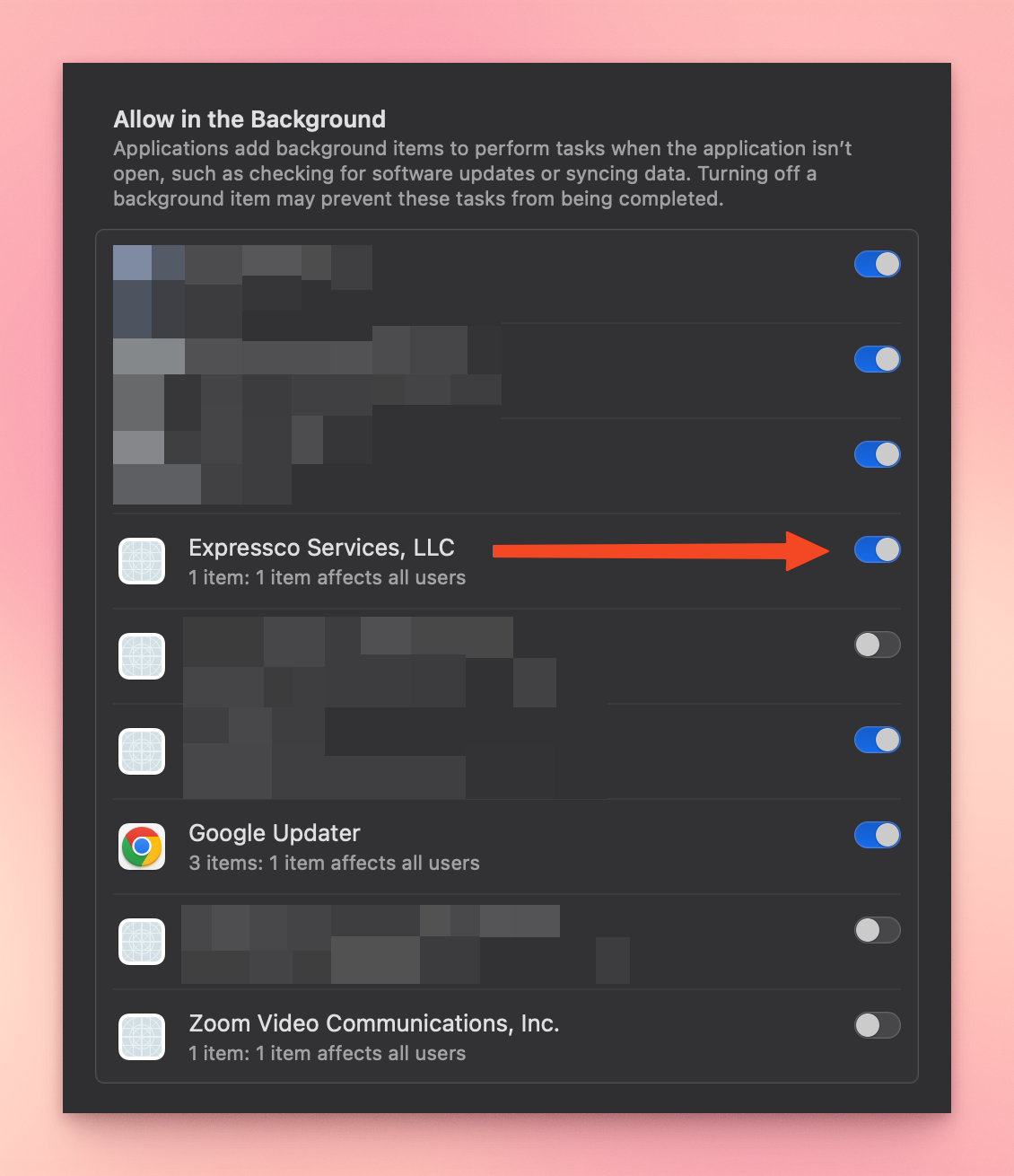
You see — for most people, the "Login Item & Extension" called "Expressco Services, LLC" becomes enabled the first time you ever install the ExpressVPN app. But months ago, during a paranoid episode, I manually disabled the “Login Item & Extension” called “Expressco Services, LLC”.
Fair enough for a risqué blogger fearing malicious surveillance of my internet activity — I didn’t recognize the name "Expressco" so I turned it OFF.
Each time I restarted my computer, the ExpressVPN app wouldn’t work at all. I’d see the app window show up with a white background and red logo, but after that, the app window would disappear and I wasn’t connected to VPN at all.
For months after that, I used a workaround to connect to VPN each time after restarting my MacOS computer. I’d need to click on the “expressvpn_mac_#_release.pkg” file to fresh install the ExpressVPN app. It took about 15 seconds of clicking around to re-install the ExpressVPN app every single time I restarted my computer. But it’d connect.

It’s kind of funny that I was the source of the issue. I mean — now that it’s fixed.
No, “Expressco Services, LLC” is not a British retailer of gazebos based in Birmingham incorporated in 2006 — that’s Expressco Direct.
No, “Expressco Services, LLC” is not a strong small cup of coffee company.
Yes, “Expressco Services, LLC” is part of ExpressVPN, and it makes the ExpressVPN app functional on Mac computers running MacOS.
Yes, users like me who prefer internet privacy while sensing ideas of reference, would probably know to enable its “Login Item & Extension” if it have VPN in the name — something like “ExpressVPN Services, LLC” or “ExpressVPN, LLC” for short.
If I woulda seen “VPN” in the name, it wouldn’t have been months of me manually clicking after each restarting.
But I fixed the problem now. ExpressVPN costs between $3.50 and $13.00 per month, depending on the long-term commitment you buy into, so I’m happier now. I use ExpressVPN on MacOS.