Graycare (graycare.net) is a participant in the Amazon Services LLC Associates Program, an affiliate advertising program designed to provide a means for us to earn fees by linking to Amazon.com and affiliated sites. Learn More

Okay, you’ve got an Echo device plugged into the electricity and connected to wifi.
You’ve got the Amazon Alexa App downloaded on your phone.
If you own an Echo device, also known as an “Amazon Alexa Echo Device” or any jumble of those words, then you 100% should be downloading and using the app on your smartphone.
Today we’re gonna get hiphy to the music you like with your Echo and iPhone with Amazon Alexa App.
PRO TIP: Amazon.com knowledge base #ad recommends using common playback commands like “Play” or “Stop”. This is one official list of commands to play music with using your voice - that are easy and accurate, and recommended for seniors, family members, and caregivers of the elderly to relax and/or party.

These lil tips and tricks help you put on the music you like.
You don’t want to play music. You want to play the music you like.
BONUS: I’m going to show you how to avoid getting asked to pay for a premium service. So you’ll be a guru at the FREE version with free music selections - though I do highly recommend an Amazon Prime subscription if you prefer fewer advertisements when listening to music on your Echo device.
These voice commands you speak with your voice while in the same room as your Echo device are the key to getting started jamming with Amazon music throughout the house.
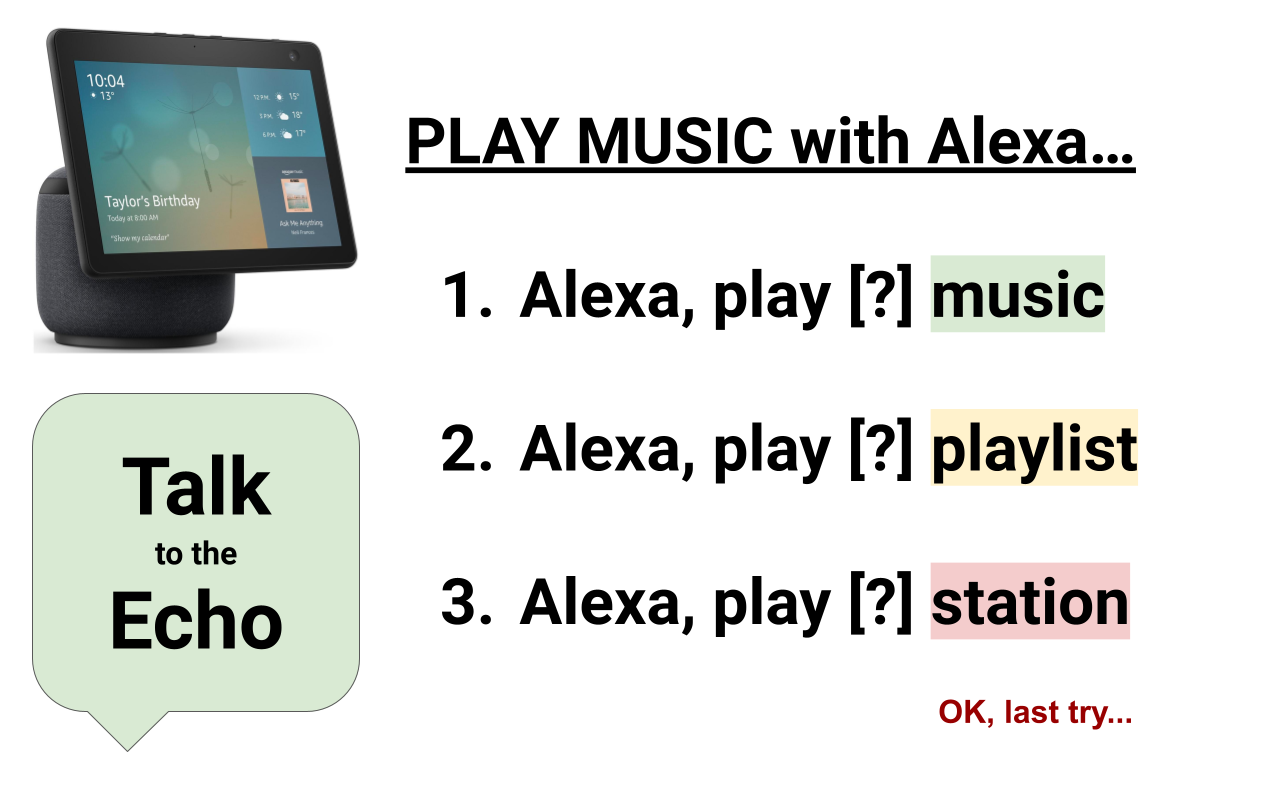
Try using just one-word or two-word genres for best results, like “Reggae” or “Synth Wave” for an uplifting vibe (with old dad).
“Echo, play rock’n’roll music.”
You’ll get a free playlist. The playlist starts with songs very relevant to the {genre} you said. But song-to-song it starts to weave into different genres.
This is how to avoid getting told “I cannot play songs by specific artists. Do you want to buy an Amazon Music subscription?”
“Echo, play an Elvis station”
“Echo, play a Black Eyed Peas station.”
“Echo, play a Crosby, Stills, and Nash station.”
For me with my old dad, I don’t want to hit paywalls like this especially much. When you want to play a specific artist, you can use the word “station” to get it for free.
The methods above aren’t foolproof. When my Echo device and I can’t seem to play the right music together, I try “Plan B”, using the word “podcast”.
“Echo, play a Traditional Arabic Music podcast.”
“Echo, play a Sleep Time Sounds podcast”
“Echo, play a Underground Detroit Trap podcast”
I haven’t tried this one yet, because I’m especially worried about hitting the paywall.
2023 has been an excellent year for Amazon Alexa-optimized Echo devices that fit into your smart home experience.
To find the newest version, shop Smart Home Devices on Amazon.com. For 2023, it was the 2023's New Version Echo Show and the First-Ever Fashion-Forward Echo Pop. It’s our favorite easy to use economy entertainment for aging people, their families, and their caregivers.
If you’re a rebellious teen who thinks old people are grumpy, you’ll still enjoy it. Because you can play whatever music you want.
This is how.
Yes.When powered with electricity and connected to the internet, you can play music by speaking voice commands to your Echo device. Try “Echo, play music at Volume 3” or “Echo, Stop” if needed.
Yes. Just download the Amazon Alexa App or the Amazon Music App on your smartphone, and you can listen to limited music playlists, stations, and radio shows for free.
The truth is, I started using Amazon's Alexa App and Music App after I bought an Echo device, because other apps like Spotify or YouTube Music are probably better bets for people who don't have an Echo and just want to listen to music on their phone.
Yes. For the best experience, install the Amazon Alexa App on your smartphone, then install the Amazon Music App on your smartphone. Make sure you’re logged into your Amazon Account on both apps, because your Amazon Account is where you set up and control your Echo devices and other Alexa-enabled smart home devices. Now, pick your music from the Amazon Music App, and “Cast” it to the Echo device you want.

Alternatively, you can play music direct from the App, but this App is not as good for Music selection. So I still recommend you “Start playing music from your Amazon Music App” but you can “Start playing music from your Amazon Alexa App” too. Both can broadcast music from your Echo device. Amazon Music is better for Music Selection. Amazon Alexa App works a bit more compatible with Echo devices.
Yes. In my home, I’ve got an Echo Show in the living room, Echo Dot in my old dad’s bedroom, and another Echo Dot in the Office.
It works like this.
BEFORE YOU START: But first you need the Echo devices setup with the internet and the Amazon Alexa App. I highly recommend you also have the Amazon Music App. It’s the best setup when you own a Prime subscription like many but not all Americans. If you don’t have an Amazon Prime subscription, maybe just the Alexa App is better for you, because your Amazon Music selection may be more limited without Prime.
I'll say it again - People who pay for a Prime subscription enjoy a better experience with fewer ads. It's so much better with Prime, and I don't pay for the Amazon Music subcription at all - we're good at low cost.
But if you don't have Prime, you'll hear advertisements on the regular.
My least favorite thing about listening to music with Amazon Alexa app is its Ads from Amazon when I'm trying to do something else. It's the very same experience as when you get interrupted by an ad on YouTube and have to wait before you can skip.)
As part of the free version... after you've been reminded to upgrade and pay, but you just sit quiet and wait... there are some limitations.
You cannot pick specific song titles or artists. You have to pick a genre, music style, or mood you want to listen to.
Like a free music playlist for the elderly, Amazon's selection of free music stations is really great.
Again, I could just do without the ads.
There are 1,000s of Alexa Skills. That means there are 1,000s of things you can get Alexa to do.
No, Amazon won’t stop asking you to pay until you finally do pay.
Playing music with Amazon smart home technology is a much better experience for people who at least have a Prime membership.
I currently have not tried an Amazon Music subscription, and my family is doing good.
With a setup like mine, if you learn a few easy-to-remember music commands, you can get by with good music without paying.
When you ask to play music from a specific artist, you will be asked to pay. Don’t say “Echo, play Ed Sheeran music”. You will hit a paywall.
When you ask for a specific song, Echo will ask you to pay. Don’t say “Echo, play Hotel California”. You will hit a paywall.
We bought the Amazon Echo device. We are economical people. We don’t want to pay for more subscriptions. We want to use what’s already free. That’s what I’m showing you how to do.
Thanks, Amazon, for making my life more delightful. I can calm my dad down with Led Zeppelin when he’s having a sundowning anxiety attack from or resulting in high blood pressure. I can start a dementia dance party with my dad a Joe Budden station “Bump, Bump, Bump Me Up” with my dad’s Parkinson’s out the chair. As the uncanny Big Poppa lil gangreen duo, me and my dad party to tunes with our sips in high class and medium volume when I’m free, mostly on weekends.
If you want to play music for free with Amazon Alexa App, then you just have to learn a handful of simple commands. This way, I’ve learned to avoid payment traps.
You can ask your Echo device to play music right after you take it out of the box, plug it in, and follow the audio setup after you get it connected to wifi. Like I described above, my older family members either can’t or aren’t willing to explore music options with Alexa.
With Amazon's free music services, you can’t get away from advertisements. But you can speak the correct music-related commands to avoid getting asked to buy a music subscription.
UPDATE: This post was updated in April 2024 to reflect Amazon Alexa technology’s feature which allows you to change the wake word from default “Alexa” to preferred “Echo,” “Amazon,” “Computer,” or “Ziggy”. You can change yours using Amazon official instructions, here.